Harnesswalk: seeing inside an AI agent harness
 Vince ElizagaAdmin
Overview
An AI agent is more than a model call and a tool loop. Around that loop sit input guardrails, a context builder, memory, policy and approvals, output guardrails, tracing, evaluations and releases. You can read about those pieces in any architecture diagram. You rarely get to watch them work.
Harnesswalk is my attempt to change that. It runs a complete agent harness locally and draws it as a live diagram. Send a message and the nodes light up in order as the request moves through them. Click any node to see its code, its configuration, the exact payload it saw and the events it emitted.
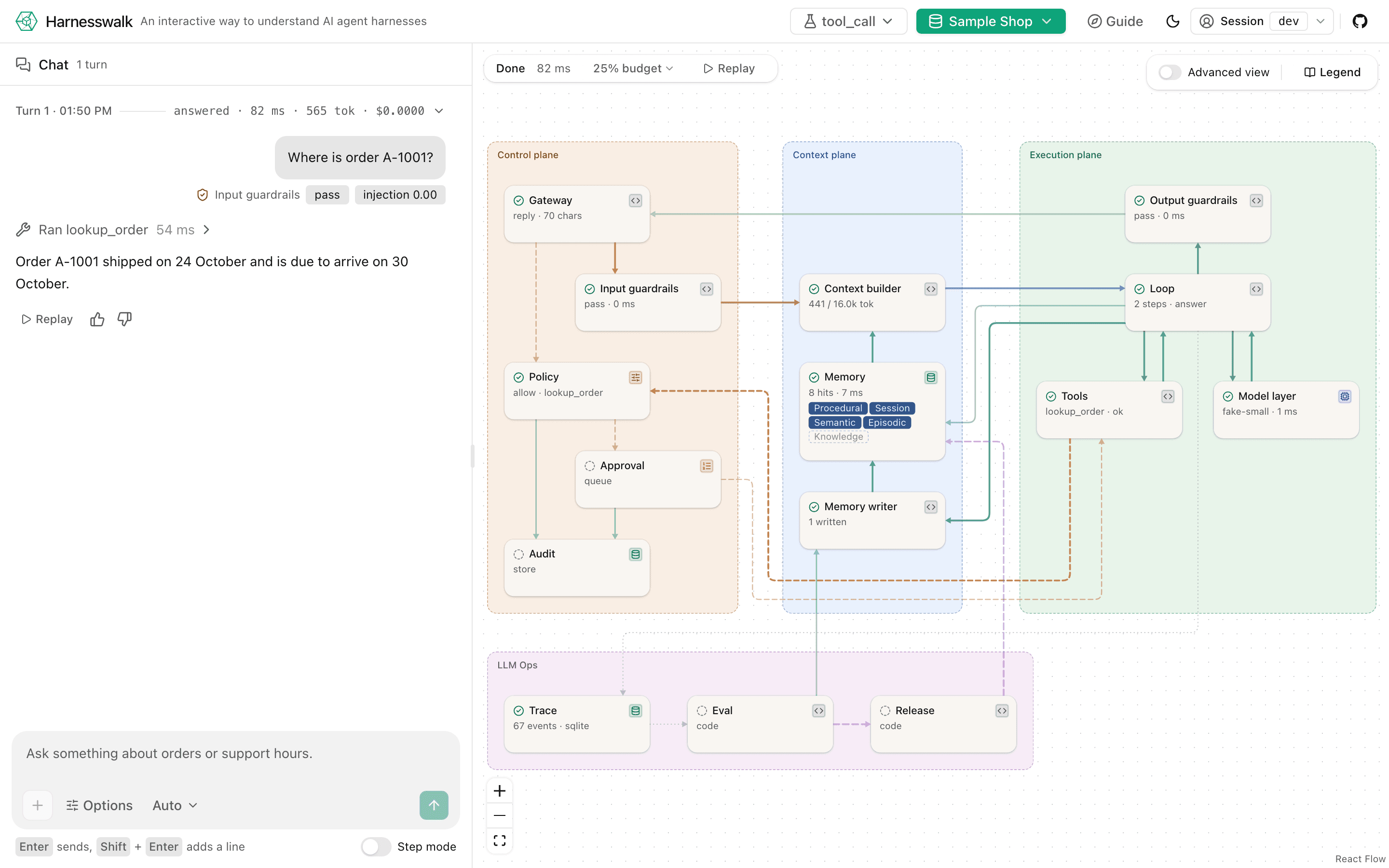
The source is on GitHub under Apache-2.0. This post is about three things: where the idea came from, how I hope developers will use it, and what to do once you have learned what it has to teach.
Ideation
The thirst came from a whiteboard. I was preparing a systems design exercise: draw an AI agent harness, the infrastructure that turns a model into something you can put in front of users. I drew the boxes that everyone draws. Gateway, guardrails, context builder, the loop, tools, memory, policy, an audit trail, evals, releases. Then came the questions I could not answer from the drawing. What does the model actually see after the context builder is done with my message? Where does a redacted email address go, and does it ever come back? What happens to a tool call that policy refuses? When a memory is written, who approved it?
I had built agents before. I had never watched one. Every framework I had used showed me how to connect a model, define tools and run a loop, and then hid the rest behind a log file. The diagram on the whiteboard was a promise that something like it existed somewhere, and I realised I wanted the diagram to be the product.
So the design goal became simple to say and hard to do. Every node on the diagram is real code you can read. Every edge carries a payload you can open. Every event is typed, stored and replayable. Nothing is a picture of a mechanism; it is the mechanism, drawn while it runs.
Two decisions followed from that. First, Harnesswalk is a reference implementation, not a framework. There is nothing to install into your project and nothing to lock into. The harness is a spec with a typed event stream and a conformance suite, so another runtime, in any language, can prove it lights the same diagram. Second, it has to teach. Each node comes with a short chapter that says what the node does, what breaks without it, and lets you switch it off and send the message again to see the failure for yourself.
Consumption
I wanted the first five minutes to need nothing. The hosted sandbox at harnesswalk.vynci.dev opens on an empty chat with a dataset to pick: a sample shop, a family clinic, a freight company, an outfitter, a sports league, a capital fund. Each one is synthetic and each one exists to show off a single harness feature, such as redaction, approvals before destructive tools, multi-step tool use, cost-based routing, or citations and memory.
From there the way I hope people use it is in step mode. Pause before each node, read what is about to be sent, press Next. The assembled context is the moment most people stop and stare: the system prompt, the skills index, the retrieved passages with their sources, the history and your message, each with a token count against the budget. It is the first time many developers see what “the prompt” really is.
Then the moments where the harness says no. Ask the outfitter to cancel an order and the turn stops on an approval card. The Policy node explains which rule fired and why. Approve it and the tool runs, with an audit record you can open. Switch a node off from its chapter in the Guide and send the same message again, and the reply loses its citations, or the redaction, or the approval, and you see exactly what that node was doing for you.
For developers who want to go further, the local run is one command with a scripted fake model, so the whole walk works offline, and a real model is one environment variable away.
Future
Say you have walked the diagram, stepped through a few turns and read the chapters. You know what a harness does now. The question that follows is the one I built this for: how do I make one for my own application?
The answer in Harnesswalk is a pack. A pack is a folder: your documents, a system prompt, a few skills, your tools with their action classes, guardrail patterns for the identifiers your domain carries, and a handful of golden cases. Drop it under datasets/ and it appears in the dataset menu; send a message and the same diagram lights up on your data. Data, policy and tools change together, which is the point: a new write tool needs a policy rule and an approval, a new identifier needs a redaction pattern, and both need a golden case so the eval gate refuses a release when they regress. The your own data guide walks through a pack for your own support documents end to end, from the first folder to a real model answering with citations.
That is the shape of an agent for your application: not a framework you adopt, but a harness you understand, with your domain plugged into the nodes you have already watched. If your stack is elsewhere, the spec and the conformance suite are the bridge. A runtime in any language that emits the same event stream lights the same diagram, and adapters for existing graphs and agent SDKs are the next thing I want to see built, by me or by you.
What is coming in the app follows the same path. Private workspaces, so you can upload your documents and keep your sessions and memory without touching a folder; the menu entry is already there, disabled, because I would rather show where it is going than hide it. More runtimes and adapters through the conformance suite. And one post per node as that work lands, each one linking back to the live diagram.
If you build agents in production, I would value ten minutes of your feedback on what the harness is missing. The best place is the repository. Try the sandbox first; it needs nothing installed and the sessions delete themselves after two hours.